


Graduate Checklist

Review the information below to ensure you are all set for your ceremony
Information on this page is for Durham ceremonies. If you are a student attending a Peterborough ceremony, please visit the Peterborough Convocation site.
Before Convocation Day
- Apply to graduate
- Find your ceremony date and time on the convocation schedule.
- Register to attend your ceremony
- Guest tickets
- Guest Accessibility
On Convocation Day
- Arrive at least 1 hour before your ceremony
- Check-in
- Gowning
- Take the green pledge
- Line-up
- Ceremony flow and stage directions
- Capture the moment
- Return your gown
- Pick up your degree
- Enjoy your new alumni status
Not Attending Convocation?
Still have questions? Visit our Frequently Asked Questions page
Before Convocation Day
1. Apply to Graduate
To graduate and receive your degree, you must complete the Application to Graduate and receive confirmation from the Registrar's Office (undergraduate students) or the School of Graduate Studies (graduate students) that you have completed all your requirements to graduate.
Students who have completed their degree requirements and are free of financial obligations to the University are eligible to receive a degree or diploma.
To learn more about the application process, watch the How to Apply to Graduate video or visit the Office of the Registrar website.
If you have questions about the status of your application to graduate, please contact:
- Undergraduate Students: the Office of the Registrar (registrar@trentu.ca)
- Graduate Students: the School of Graduate Studies (graduaterecords@trentu.ca)
2. Find your ceremony date and time on the Convocation schedule
Durham 2026 Schedule
| Date & Time | Degrees & Majors |
|---|---|
Friday, June 12 9:30 a.m. EDT | Master of Management (including Strategic Change & Health Care Management) Bachelor of Business Administration Joint degrees with Business Durham Postgraduate Certificates |
Friday, June 12 2:00 p.m. EDT | Bachelor of Social Work Bachelor of Arts & Science Honours and & General Bachelor of Arts Honours & General |
3. Register to attend your ceremony
The RSVP closed May 20th. Email convocation@trentu.ca for questions.
4. Guest Tickets
Guest tickets are not required for the Durham ceremonies. We encourage graduates to bring as many friends and family as possible to celebrate their success.
Seating is available on a first-come, first-served basis, and large groups are encouraged to arrive early to ensure they can be seated together.
5. Guest Accessibility
Guests who require accessibility arrangements at the Tribute Communities Centre, including wheelchair access, special seating, floor plan information, accessible parking details, or other accommodations, are encouraged to contact Shannon Amos, Accessibility Coordinator, directly at Shannon.Amos@oakviewgroup.com in advance of the ceremony.
Want to learn more about Accessibility at the Tribute Communities Centre? Please see their Accessibility Resources
On Convocation Day
1. Arrive 1 hour before your ceremony
Please check in at the Tribute Communities Centre at least one hour before your ceremony. This will leave you plenty of time to check in, get your gown and hood, and soak in the excitement.
Don't forget to bring your Trent student card or another piece of photo ID (i.e., driver's license, Ontario Photo Card, or Passport). This will be required for check-in and degree pick-up.
Graduates and guests will access the Tribute Communities Centre through different entrances.
- Guests will use the main entrance off Athol St E
- Graduates will proceed directly to Rink 2, accessible at the corner of Bruce St and Red Tilson Lane (see overhead map below)
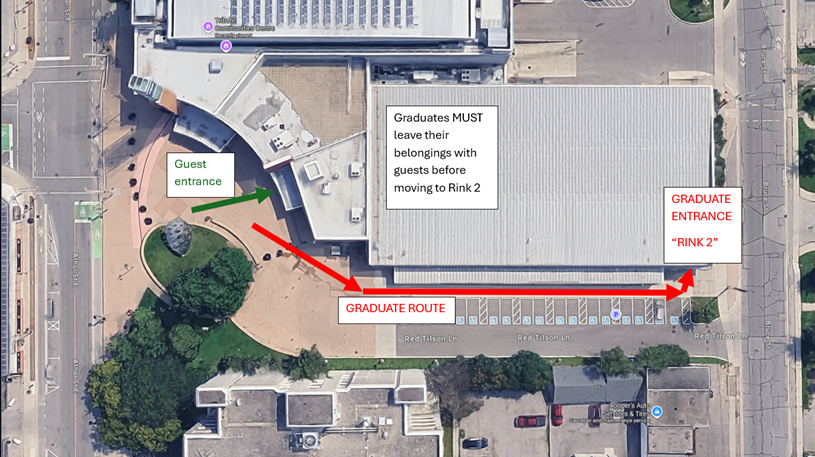
Graduates should not enter through the main guest entrance. Once you arrive at the Tribute Communities Centre, please separate from your guests and follow the graduate route to Rink 2.
Before heading to Rink 2, graduates must leave any belongings with their guests, including bags, coats, purses, or valuables. You will not be able to carry these items with you once you proceed to the graduate entrance. Remember to bring your Trent Student Card or a valid Photo ID.
To reach the graduate entrance, head to the right and walk along the outside of the building. Continue all the way past the accessible parking spaces and toward the back side of the Tribute Communities Centre. The graduate entrance will be clearly marked as “Rink 2.”
Convocation Ambassadors are present to guide you if you require additional support.
2. Check-in
When you arrive at Rink 2 at the Tribute Communities Centre, volunteers will welcome you and direct you to check in with the Registrar's Office.
To check in, you MUST have a piece of photo ID.
Once checked in, you will receive your name card, which lists your degree, program, and line-up number. HOLD ON TO IT - you MUST have this card with you at the ceremony to walk the stage.
3. Gowning
Gowns and hoods are provided. You do NOT need to purchase regalia for Convocation.
After you have checked in and received your name card, you will be guided to the gowning area. Hand your name card to the gowning volunteers, who will provide you with a gown and hood. Take a look at the Official Trent Convocation Academic Regalia document to see what regalia you will be wearing.
You MUST return your regalia by 12:00 p.m. for morning ceremonies or 4:30 p.m. for afternoon ceremonies, before picking up your degree.
4. Take the green pledge
Upon exiting the gowning room, you can choose to take the green pledge and wear a green ribbon during the ceremony:
"I pledge to explore and take into account the social and environmental consequences of any job I consider and will try to improve these aspects of any organization for which I work."
5. Line up
Once you have been gowned, you line up in the student marshalling area in Rink 2.
10 minutes before the ceremony begins, you will be led to the main hallway before the graduate procession begins.
6. Ceremony flow & stage directions
- Following the Indigenous procession and bagpiper, graduates will process into the ceremony through the middle aisle and take their seats to the left and right of the stage.
- Students will be called row by row to cross the stage. Hand your name card to the stage marshal and cross the stage when you hear your name called.
- On stage, you will shake the hand of Chancellor Stephen Stohn and a member of Trent University's Senior Leadership team. Miranda Studios will capture a few photos of the special moment.
- Upon exiting the stage, you will be greeted by a representative of the Trent Alumni family and directed to Miranda Studios' portrait area for another photo, then head back to your seat.
- Note that photos taken by Miranda Studios will be available for purchase. Proofs and purchasing options will be sent to your Trent email in the weeks following the ceremony.
7. Capture the moment
After the ceremony, you can take photos with your family and friends outside the Tribute Communities Centre or in front of backdrops behind the stage.
8. Return your gown
You MUST return your gown and hood by 12:00 p.m. for morning ceremonies or 4:30 p.m. for afternoon ceremonies, before picking up your degree.
9. Pick-up your degree
Your degree will be available for pick-up in Rink 2 following the ceremony, after you return your gown. Make sure to bring your student card or a piece of photo ID.
10. Enjoy your new alumni status
While in the Event Space, head over to the Alumni table to meet the Alumni Engagement & Services team. They will welcome you to the Alumni family, gift you your alumni pin, and help get you connected with the Trent Alumni Perks app to unlock all of your new exclusive discounts and benefits.
Visit trentu.ca/alumni for information on the benefits, services, programs, and events offered to you for free!
Not Attending Convocation?
1. Apply to graduate
To graduate and receive your degree, you must complete the Application to Graduate and receive confirmation from the Registrar's Office (undergraduate students) or the School of Graduate Studies (graduate students) that you have completed all of your requirements to graduate.
To learn more about the application process, watch the How to Apply to Graduate video or visit the Office of the Registrar website.
If you have questions about the status of your application to graduate, please contact:
- Undergraduate Students: the Office of the Registrar (registrar@trentu.ca)
- Graduate Students: the School of Graduate Studies (graduaterecords@trentu.ca)
2. Degree certificate pick-up
- Students who have completed their degree requirements and are free of financial obligations to the University are eligible to receive a degree or diploma.
- Degree certificates will be held for two years. After this period, you must request and pay for a replacement.
| Undergraduate Students | Graduate Students | |
| Spring Graduates (following the Winter term) |
|
|
| Fall Graduates (following the Summer term) |
|
|
NOTE: Convocation ceremonies are public events that are photographed, recorded, and livestreamed on trentu.ca/live. By attending, you are providing consent that Trent University may use your likeness in any future Trent materials without compensation. If you have any questions, please contact convocation@trentu.ca.