

Trent University
MyTrent
  • Academics
    • Degrees and Programs
    • Academic Calendar
    • Academic Timetable
    • Academic Advising
    • Academic Skills Centre
    • Library
  • Admissions
  • Research
  • Student Life
    • Athletics & Recreation
    • Residence and Housing
    • Student Experience
    • Student Support & Services
  • Give to Trent
  • About Trent
    • At a Glance
    • News & Events
    • Visit Us
    • How to Find Us
    • Contact Us
  • Campus Locations
    • Peterborough
    • Durham GTA
    • Online
  • Future Students
  • Current Students
  • Alumni
  • Apply
  • Visit
  • Give
  • Map
  • Careers
  • Directions
  • Library
  • Site Map
Skip to main content Trent University - Durham Greater Toronto Area Logo
MyTrent Login
  • VISIT OUR CAMPUSES :
  • Peterborough
  • Durham GTA
  • Online
MENU
A group of students chatting with their professor

EXPLORE DURHAM

  • Choose Trent Durham
    • Degrees & Programs
    • Admission Requirements
    • Discover Trent Durham
      • Come to Open House
      • Book a Tour
      • Interactive Map
    • Residence & Housing
    • Explore Scholarships
    • Experience the Best of Oshawa
    • Connect with an Advisor
    • Ready to Apply? Get Started!
  • Academics
    • Academics at Trent Durham
    • Degrees & Programs
    • Postgraduate Certificates
    • Academic Calendar
    • Academic Timetable
    • Library
    • Study Abroad
  • Student Support & Services
    • Academic Advising
      • Course Load
      • Course Selection & Registration
      • Course Selection FAQs
      • Credits vs. Course
      • Elective Courses
      • First-year Course Requirements
      • Registering for your course
      • Timetables
      • Transfer Students
      • Understanding your Degree/Program Requirements
      • Video Tutorials
    • Academic Skills
    • Campus Store
    • Careerspace & Career Services
    • Counselling
      • Community and Self-Help Resources
      • Crisis Resources
      • Peer Support
    • Event Planning
    • Exam Centre
    • First Peoples House of Learning
    • Health Benefit Plan
    • Student Accessibility Services
    • Trent International
    • TrentU Card
  • Campus Life
    • Athletics & Recreation
    • Club & Groups
    • Residence & Housing
    • Food Services
    • Parking
    • Transit
    • Employment Opportunities
    • Volunteer Opportunities
    • Trent Durham Student Association
    • New Student Orientation
      • Eyes on PSE
      • Foundations for Success Certificate Program
    • Student Engagement Programs
  • Research
    • Dean’s Research Fund
    • Research Hubs
    • Faculty
    • Innovation
    • Research Opportunities for Students
  • About Trent Durham GTA
    • Greetings from the Trent Durham VP
    • Advanced Learning Centre
    • How To Find Us
    • Why Choose Oshawa
    • Employer Engagement
    • Government Relations & Community Partnerships
    • News & Events
  • Contact
  1. Trentu.ca
  2. Trent Durham GTA
  3. Student Supports & Services
  4. Academic Advising
  5. Register in Your Courses

Supports & Services

  • Students Support & Services
  • Academic Advising
    • Course Selection & Registration
    • Video Tutorials
    • Book an Appointment
  • Academic Skills
    • Academic Skills Bundles
  • Counselling
    • Urgent Supports
    • Community and Self-Help Resources
    • Additional Resources - Partnerships
  • First Peoples House of Learning
  • Trent International
  • Student Accessibility Services
  • Exam Centre
    • Information for Faculty
    • External Proctoring Services
  • Careerspace & Career Services
  • Event Planning
  • Health Benefit Plan
Image
Lets stay in touch


Registering for your course

  • Choose Trent Durham
    • Degrees & Programs
    • Admission Requirements
    • Discover Trent Durham
      • Come to Open House
      • Book a Tour
      • Interactive Map
    • Residence & Housing
    • Explore Scholarships
    • Experience the Best of Oshawa
    • Connect with an Advisor
    • Ready to Apply? Get Started!
  • Academics
    • Academics at Trent Durham
    • Degrees & Programs
    • Postgraduate Certificates
    • Academic Calendar
    • Academic Timetable
    • Library
    • Study Abroad
  • Student Support & Services
    • Academic Advising
      • Course Load
      • Course Selection & Registration
      • Course Selection FAQs
      • Credits vs. Course
      • Elective Courses
      • First-year Course Requirements
      • Registering for your course
      • Timetables
      • Transfer Students
      • Understanding your Degree/Program Requirements
      • Video Tutorials
    • Academic Skills
    • Campus Store
    • Careerspace & Career Services
    • Counselling
      • Community and Self-Help Resources
      • Crisis Resources
      • Peer Support
    • Event Planning
    • Exam Centre
    • First Peoples House of Learning
    • Health Benefit Plan
    • Student Accessibility Services
    • Trent International
    • TrentU Card
  • Campus Life
    • Athletics & Recreation
    • Club & Groups
    • Residence & Housing
    • Food Services
    • Parking
    • Transit
    • Employment Opportunities
    • Volunteer Opportunities
    • Trent Durham Student Association
    • New Student Orientation
      • Eyes on PSE
      • Foundations for Success Certificate Program
    • Student Engagement Programs
  • Research
    • Dean’s Research Fund
    • Research Hubs
    • Faculty
    • Innovation
    • Research Opportunities for Students
  • About Trent Durham GTA
    • Greetings from the Trent Durham VP
    • Advanced Learning Centre
    • How To Find Us
    • Why Choose Oshawa
    • Employer Engagement
    • Government Relations & Community Partnerships
    • News & Events
  • Contact

Register in Your Courses

Content Title
Register in Your Courses
Body

Before you start:

New students:

Use the existing information under step 1 and step 2 of the course registration page found here.

Continuing students:

Refer to the academic calendar and the “my progress” function in self-service to ensure you know what courses you need to satisfy your program requirements and university requirements.

Step 1:

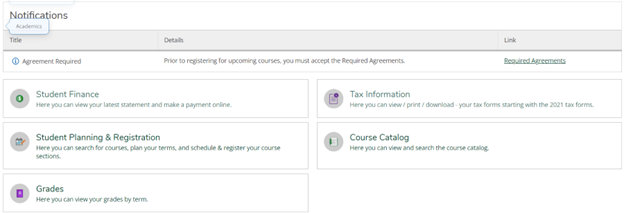
Login to MyTrent, click on the ‘academics’ tabs, then click on the ‘self-service’ icon.

Step 2:

Click on the ‘course catalog’ button to start searching for courses.
Step 3:

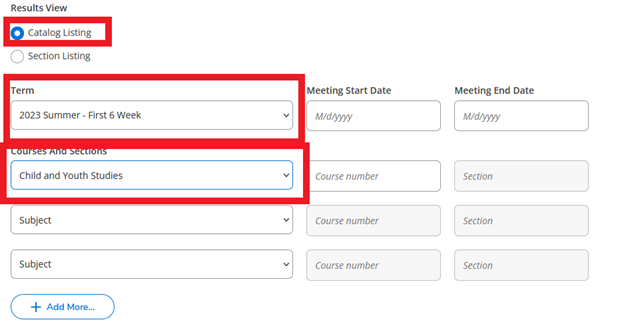
Once in the course catalog, you can do a catalog listing or a section listing. In this example, we will do a search for Child and Youth courses in the first 6 weeks of summer (the S61 term).
Step 4:

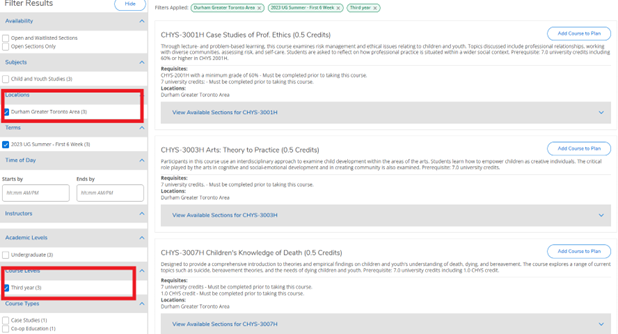
Apply your filters.  For example, ‘Durham campus’, ‘third year’ courses.
Step 5:

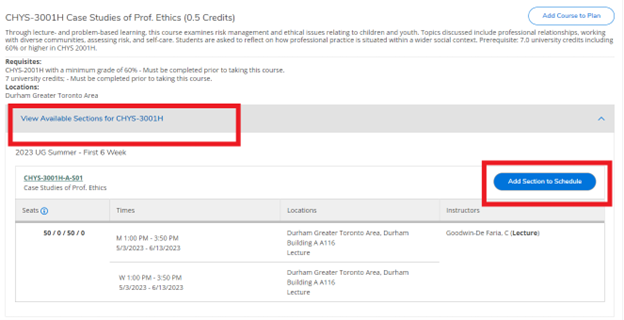
Click on the “view available sections” box under the courses being added.  Click on the blue “add section to schedule” button.
Step 6:

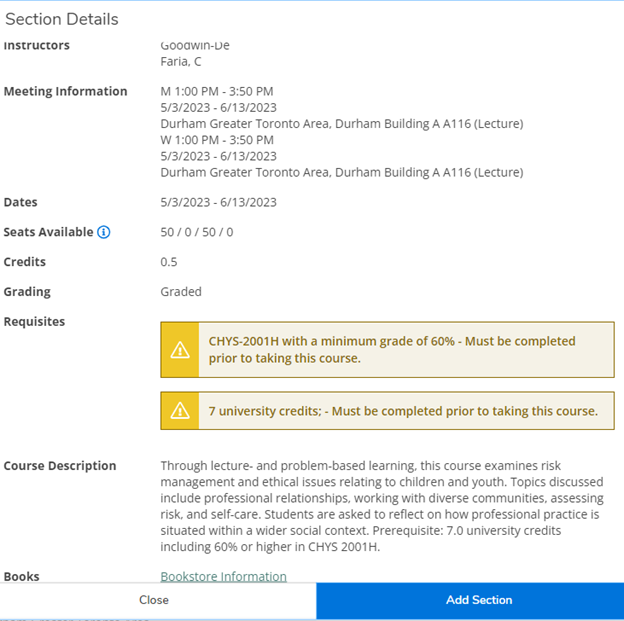
A box will pop up with additional details on the course, including prerequisite courses.  Proceed with “add section” if you meet the prerequisites.
Step 7:

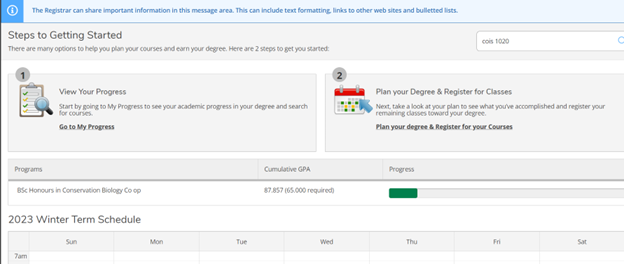
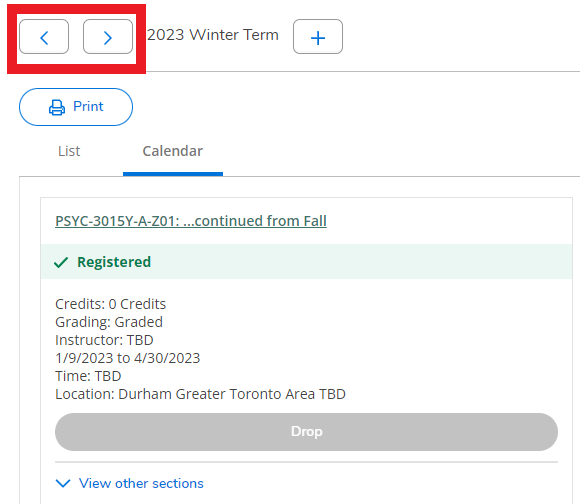
Once all courses are added, go back to the home page of self-service, and then click on the Student Planning and Registration icon, then click on “Plan your degree and register for your courses” at the top of the page. By default, this will load the current term. Click on the arrow to get to the summer term. Note that S12, S61, and S62 are treated as distinct terms and you will need to go through this process separately for each term.
Step 8:

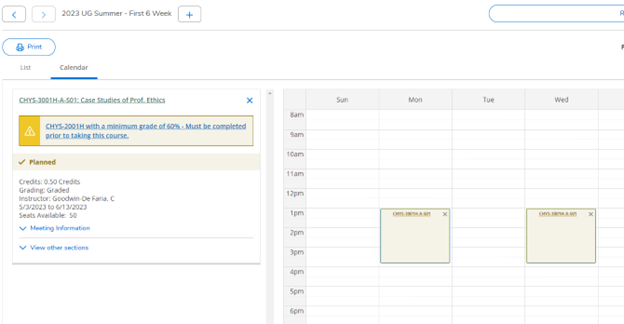
Hit the arrow to the next term for summer to see the course section(s) added. Hit the arrow again to view the next term as well (i.e. S62).
Step 9:

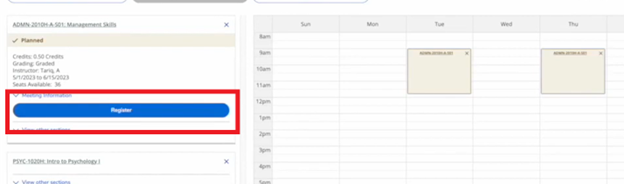
The last step is to register. Click the icon on the left under each individual course added.
Any issues using this registration platform?  Take a screenshot of the issue and email registrar@trentu.ca.

Please note that there are multiple ways to add courses to your plans. This guide shows just one of those ways. Please refer to the videos for additional information on self-service.

Video Tutorials

How to Find Courses and Register for Courses using Self-Service

Download the How to Find Courses, Add Courses to Plan, and Register for Courses in Self-Service video transcript

How to Drop a Course using Self-Service

Download the video transcript for How to Drop a Course using Self-Service

The last date to drop courses without academic penalty can be found under the Academic Dates and Deadlines sections of the Academic Calendar. Students considering dropping a course should consult with an Academic Advisor.

How to Change Course Sections for a Course using Self-Service

Download the video transcript for How to Change Course Sections for a Course using Self-Service

CONNECT WITH US

Body

Start your #TrentU Bound journey off on the right foot! Share your contact info so we can send you program information, event invitations, and help with your next steps to Trent.

Webform
Terms & Conditions

By signing up, I agree to receive emails from Trent University and to the Privacy Policy and Terms of Use. You may opt out at any time.

Explore all programs at Durham

GO
Trent University - Durham Greater Toronto Area Logo

Trent University respectfully acknowledges it is located on the treaty and traditional territory of the Mississauga Anishnaabeg.

We offer our gratitude to First Peoples for their care for, and teachings about, our earth and our relations. May we honour those teachings.

The Campaign For
Momentous
Action Research Leadership Debate Performance Connection Discovery Ideas Places Stewardship Support Change

CONNECT WITH US:

Social Media Directory

Trent Durham GTA Campus

55 Thornton Road South
Oshawa, ON Canada, L1J 5Y1

Phone: 905-435-5100

Campus Map

Trent Peterborough Campus

1600 West Bank Drive
Peterborough, ON Canada, K9L 0G2

Toll Free: 1-855-MY-TRENT

Campus Map

  • @ Copyright 2025 Trent University
  • Contact Us
  • Directions
  • Site Map
  • Accessibility
  • Term Of Use
  • Privacy Policy