

Trent University
MyTrent
  • Academics
    • Undergraduate Programs
    • Graduate Programs
    • Trent Online
    • Summer Courses
    • Continuing Education
    • Study Abroad
    • Academic Calendar
    • Academic Timetable
    • Academic Skills Centre
    • Academic Advising
    • Library
    • Centre for Teaching and Learning
  • Admissions
    • Undergraduate
    • Thinking of Applying
    • Already Applied
    • Received an Offer
    • Accepted My Offer
    • Graduate
    • International
    • Indigenous
    • Returning to Trent
    • Transfer
  • Services & Support
    • Academic Advising
    • Academic Skills Centre
    • Administrative Departments
    • Alumni Services
    • Athletics
    • Campus Security
    • Careerspace
    • Colleges
    • Communications
    • Conferences
    • Financial Aid
    • Financial Services
    • Health & Wellness
    • Indigenous Services
    • Information Technology
    • International Students
    • Learning Support
    • Parking
    • Printshop
    • Recruitment
    • Registrar's Office
    • Residence & Housing
    • Student Clubs
    • TrentU Card
  • Research
    • Research at Trent
    • Research Centres
    • Find an Expert
    • Resources
  • Give to Trent
  • About Trent
    • About Trent
    • Careers
    • Giving to Trent
    • Governance
    • How to Find Us
    • Media
    • News & Events
    • President's Office
    • Staff Directory
    • Trent Facts
    • Contact Us
  • Campus Locations
    • Peterborough
    • Durham GTA
    • Online
  • Future Students
    • Undergraduate
    • Thinking of Applying
    • Already Applied
    • Received an Offer
    • Accepted My Offer
    • Graduate
    • International
    • Indigenous
    • Returning to Trent
    • Transfer
  • Current Students
  • The Colleges of Trent
  • Alumni
  • Apply
  • Visit
  • Give
  • Peterborough
  • Durham GTA
  • Map
  • Careers
  • Directions
  • Library
  • Site Map
  • Bookstore
Skip to main content Home
  • Peterborough
  • Durham GTA
  • Online
  • MyTrent
MENU
Trent university East Bank View from west bank
Trent University
Human Resources
  • Welcome
  • Employment Opportunities
  • Why Work at Trent
  • Human Resources Services
  • Policies & Forms
  • VIP
  • Contact
  1. Trentu.ca
  2. Human Resources
  3. How Students Activate their Staff Account

How Students Activate their Staff Account

If you are a current student and have now been hired to work at Trent University, please follow these steps to active activate your new staff account. You must have a staff account to access VIP to view your paystubs/ T4's.


Step 1:  Check if your Staff email account has been activated through the IT Account Self-Serve Portal. Your student number and employee number are the same. Account Type should be New Hire / Staff / Faculty. Staff accounts are generated via an automatic process that takes 24-48 hours after payroll has set you up.


If your account has not be set up and it has been 24 hours after your hire date, you can try activating your account by following the steps below:

Step 1: Log in to the MyTrent portal with your student account.

Step 2: Go to Support --> Human Resources, select Activate Staff account. If you do not see this tab, please wait 24 hours after your hire day and try again. If after 24 hours you still do not see it, please contact payroll@trentu.ca to confirm you have been set up. 

Step 3: Enter your student email and 7-digit student number, then select Activate:
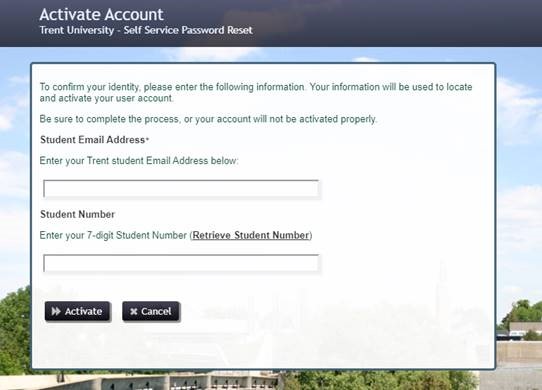
 Activate account screen


Step 4: After you select Activate the following confirmation screen will appear. Click Continue. 
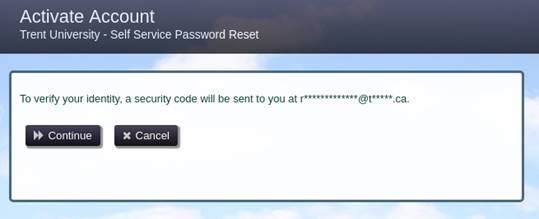
 Password reset screen

Step 5: After you select Continue, the system will send a one time link to your student email to set the password for your Trent STAFF account.  Please open this email and select the link to set your  password and complete the account activation.

Step 6: Go back to the myTrent portal and log in using your new STAFF account username and password, and follow the steps on How to Access VIP and View Your Paystubs.

For assistance with account activation please contact the IT Service Desk at extension 1010 or email it@trentu.ca.


Action Menu

  • 50/50 Employee Raffle Draw
  • Anonymous HR Feedback Submission
  • Heart of Trent Awards

Related Links

  • VIP - For Employees & Managers
  • Health and Safety
  • Human Rights, Equity & Accessibility
  • International Travel Security
  • Heart of Trent Event
Trent University Logo

Trent University respectfully acknowledges it is located on the treaty and traditional territory of the Mississauga Anishnaabeg. We offer our gratitude to First Peoples for their care for, and teachings about, our earth and our relations. May we honour those teachings.

The Campaign For
Momentous
Action Research Leadership Debate Performance Connection Discovery Ideas Places Stewardship Support Possiblity

Peterborough

1600 West Bank Drive
Peterborough, ON Canada, K9L 0G2

Toll Free: 1-855-MY-TRENT

Campus Map

Durham Greater Toronto Area

55 Thornton Road South
Oshawa, ON Canada, L1J 5Y1

Phone: 905-435-5100

Campus Map

Social Media Directory
  • Contact
  • Directions
  • Site Map
  • Accessibility
  • Privacy
  • @ Copyright 2025 Trent University