

Trent University
MyTrent
  • Academics
    • Undergraduate Programs
    • Graduate Programs
    • Trent Online
    • Summer Courses
    • Continuing Education
    • Study Abroad
    • Academic Calendar
    • Academic Timetable
    • Academic Skills Centre
    • Academic Advising
    • Library
    • Centre for Teaching and Learning
  • Admissions
    • Undergraduate
    • Thinking of Applying
    • Already Applied
    • Received an Offer
    • Accepted My Offer
    • Graduate
    • International
    • Indigenous
    • Returning to Trent
    • Transfer
  • Services & Support
    • Academic Advising
    • Academic Skills Centre
    • Administrative Departments
    • Alumni Services
    • Athletics
    • Campus Security
    • Careerspace
    • Colleges
    • Communications
    • Conferences
    • Financial Aid
    • Financial Services
    • Health & Wellness
    • Indigenous Services
    • Information Technology
    • International Students
    • Learning Support
    • Parking
    • Printshop
    • Recruitment
    • Registrar's Office
    • Residence & Housing
    • Student Clubs
    • TrentU Card
  • Research
    • Research at Trent
    • Research Centres
    • Find an Expert
    • Resources
  • Give to Trent
  • About Trent
    • About Trent
    • Careers
    • Giving to Trent
    • Governance
    • How to Find Us
    • Media
    • News & Events
    • President's Office
    • Staff Directory
    • Trent Facts
    • Contact Us
  • Campus Locations
    • Peterborough
    • Durham GTA
    • Online
  • Future Students
    • Undergraduate
    • Thinking of Applying
    • Already Applied
    • Received an Offer
    • Accepted My Offer
    • Graduate
    • International
    • Indigenous
    • Returning to Trent
    • Transfer
  • Current Students
  • The Colleges of Trent
  • Alumni
  • Apply
  • Visit
  • Give
  • Peterborough
  • Durham GTA
  • Map
  • Careers
  • Directions
  • Library
  • Site Map
  • Bookstore
Skip to main content Home
  • Peterborough
  • Durham GTA
  • Online
  • MyTrent
MENU
Trent university East Bank View from west bank
Trent University
Human Resources
  • Welcome
  • Employment Opportunities
  • Why Work at Trent
  • Human Resources Services
  • Policies & Forms
  • VIP
  • Contact
  1. Trentu.ca
  2. Human Resources
  3. How to Access VIP and view your Paystub

How to Access VIP and view your Paystub

Welcome to an introduction to VIP; Trent’s Employee and Manager Self-Serve Portal. This page will outline the steps to navigate this new system, provide brief instructions on how to access the Employee Portal, and explain how to view your paystubs.

Step 1: Employees can access VIP any time of the day and from any computer or mobile device with the internet. VIP can be accessed on a range of browsers such as Google Chrome, Internet Explorer/Edge, Firefox, or Safari. 

Step 2: VIP is accessed through the MyTrent Portal. You can find MyTrent, by searching on the Trent University website, or by typing trentu.ca/mytrent in the search bar. VIP is synchronized with your current Trent login credentials. If you forgot your username or password, you can click the link at the bottom of the MyTrent login screen.

If you require assistance accessing MyTrent, please contact the Trent IT Service Desk by email, phone or visit them on the Second Floor of Bata Library.
If you do not have a staff MyTrent account, and currently only have a student MyTrent account, please follow the instructions on how to activate your staff account.


Step 3: Once you are logged in to MyTrent, go to the VIP Icon, by either typing VIP in the top search bar, or by clicking on the Support Menu Tab, then scrolling down to the Human Resources/Payroll section.

A tip to make accessing the VIP Icon faster in the future is to drag it to your favorites bar.

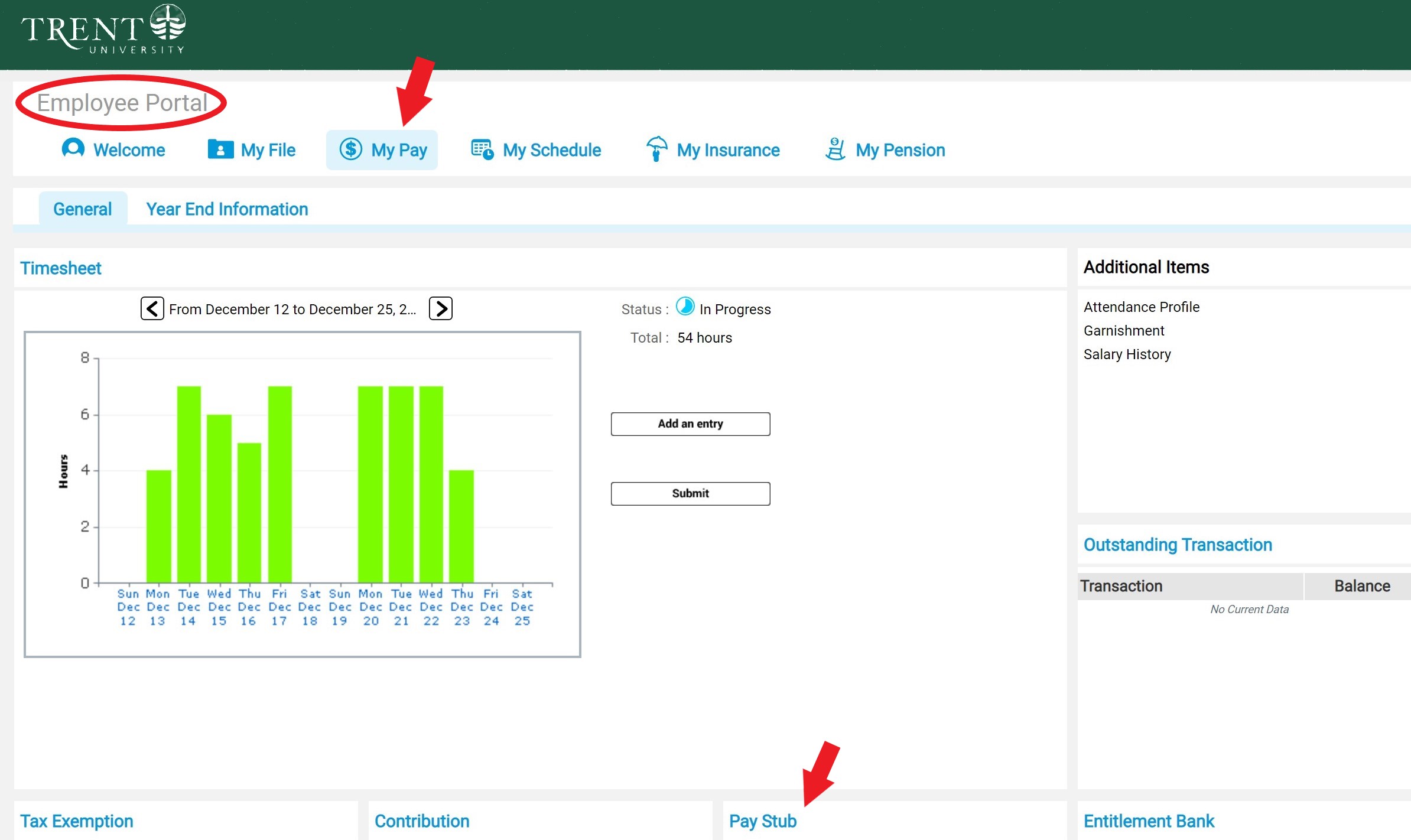
Step 4: All employees will have access to the “Employee” portal screen, where they can view a range of Human Resources and Payroll Information on file such as their, address, position details, paystubs, schedule, as well as any benefit insurance coverage and pension details, if applicable.

Managers will also see an additional “Manager” portal screen, where they can view a range of Human Resources and Payroll Information on file for employees reporting directly to them.

VIP Employee Portal


Step 5: Starting November 8, 2019, employees will have access to view their pay stubs directly on VIP. Pay stubs will no longer be sent to Epost or printed and mailed to employees. To access your electronic pay stub on VIP, navigate to the Employee Screen; click on the “My Pay” icon, then click on the Pay Stub header.
Step 6: Employees and Managers are encouraged to review the employee and manager portal screens for accuracy on items, such as your address, phone number, position, and direct reports listed.

If you notice any discrepancies in the information, have any questions or experience any trouble accessing your paystub, please reach out to HR by email at humanresources@trentu.ca or call extension 1460 during regular office hours, Monday to Friday 8:30 am – 4:30 pm.

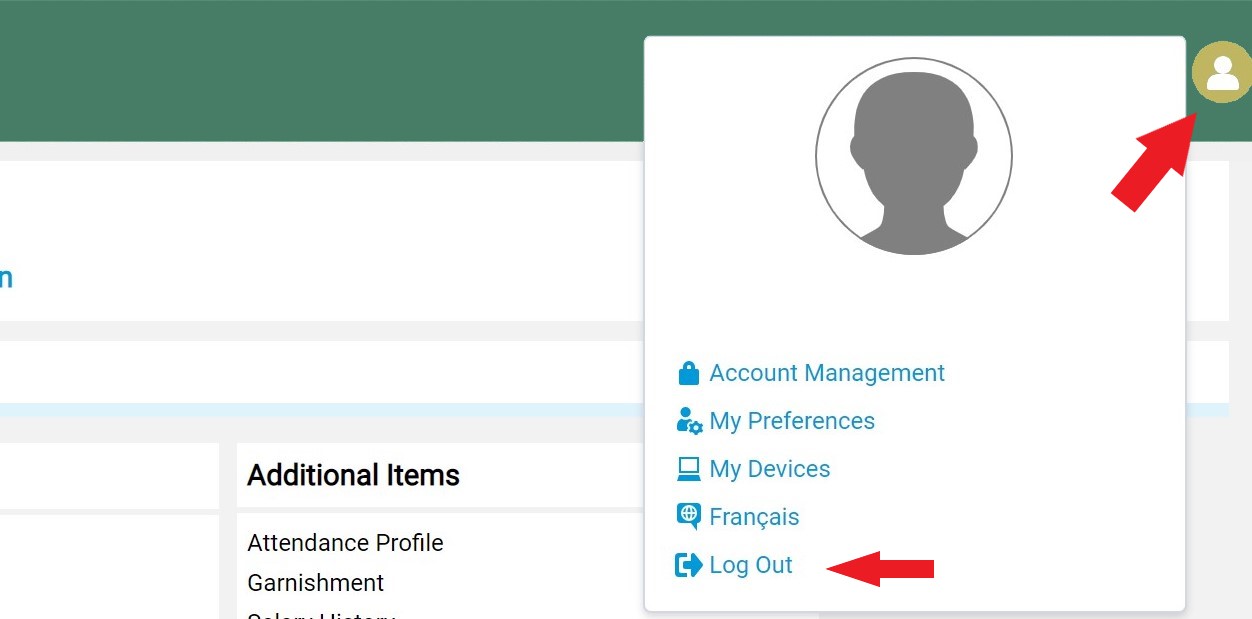
When you are finished with VIP, please be sure to Log out by clicking on the arrow beside your name on the top right hand of the screen, and selecting log out.
Step 7: If you have any further questions, please do not hesitate to contact Trent University’s Human Resources Department.

Email: humanresources@trentu.ca
Call: (705)748-1460 or dial extension 1460
Location: Blackburn Hall, Suite 116
Hours: Monday to Friday 8:30 am- 4:30 pm

Action Menu

  • 50/50 Employee Raffle Draw
  • Anonymous HR Feedback Submission
  • Heart of Trent Awards

Related Links

  • VIP - For Employees & Managers
  • Health and Safety
  • Human Rights, Equity & Accessibility
  • International Travel Security
  • Heart of Trent Event
Trent University Logo

Trent University respectfully acknowledges it is located on the treaty and traditional territory of the Mississauga Anishnaabeg. We offer our gratitude to First Peoples for their care for, and teachings about, our earth and our relations. May we honour those teachings.

The Campaign For
Momentous
Action Research Leadership Debate Performance Connection Discovery Ideas Places Stewardship Support Possiblity

Peterborough

1600 West Bank Drive
Peterborough, ON Canada, K9L 0G2

Toll Free: 1-855-MY-TRENT

Campus Map

Durham Greater Toronto Area

55 Thornton Road South
Oshawa, ON Canada, L1J 5Y1

Phone: 905-435-5100

Campus Map

Social Media Directory
  • Contact
  • Directions
  • Site Map
  • Accessibility
  • Privacy
  • @ Copyright 2025 Trent University