

Trent University
MyTrent
  • Academics
    • Undergraduate Programs
    • Graduate Programs
    • Trent Online
    • Summer Courses
    • Continuing Education
    • Study Abroad
    • Academic Calendar
    • Academic Timetable
    • Academic Skills Centre
    • Academic Advising
    • Library
    • Centre for Teaching and Learning
  • Admissions
    • Undergraduate
    • Thinking of Applying
    • Already Applied
    • Received an Offer
    • Accepted My Offer
    • Graduate
    • International
    • Indigenous
    • Returning to Trent
    • Transfer
  • Services & Support
    • Academic Advising
    • Academic Skills Centre
    • Administrative Departments
    • Alumni Services
    • Athletics
    • Campus Security
    • Careerspace
    • Colleges
    • Communications
    • Conferences
    • Financial Aid
    • Financial Services
    • Health & Wellness
    • Indigenous Services
    • Information Technology
    • International Students
    • Learning Support
    • Parking
    • Printshop
    • Recruitment
    • Registrar's Office
    • Residence & Housing
    • Student Clubs
    • TrentU Card
  • Research
    • Research at Trent
    • Research Centres
    • Find an Expert
    • Resources
  • Give to Trent
  • About Trent
    • About Trent
    • Careers
    • Giving to Trent
    • Governance
    • How to Find Us
    • Media
    • News & Events
    • President's Office
    • Staff Directory
    • Trent Facts
    • Contact Us
  • Campus Locations
    • Peterborough
    • Durham GTA
    • Online
  • Future Students
    • Undergraduate
    • Thinking of Applying
    • Already Applied
    • Received an Offer
    • Accepted My Offer
    • Graduate
    • International
    • Indigenous
    • Returning to Trent
    • Transfer
  • Current Students
  • The Colleges of Trent
  • Alumni
  • Apply
  • Visit
  • Give
  • Peterborough
  • Durham GTA
  • Map
  • Careers
  • Directions
  • Library
  • Site Map
  • Bookstore
Skip to main content Home
  • Peterborough
  • Durham GTA
  • Online
  • MyTrent
MENU
Al Slavin with students
Trent University
Online Syllabus System
  • Welcome
  • Instructor
  • Department
  • Decanal
  • Contact
  1. Trentu.ca
  2. Online Syllabus System
  3. Creating a Syllabus
  4. Tips and Tricks

Tips and Tricks

Saving and Security

For security reasons, the online system will automatically log out after 1 hour of inactivity, so be sure to save frequently. When saving for the first time, you will scroll to the very bottom of your syllabus. “Save as Draft” will be ticked, and you will click “Create”. Once a syllabus has been created, the button you will click to save will have change to now read “Update”.


Creating
Updating
 

Preview

You can Preview your syllabus at any time once it has been created, but be sure to click Update before you click Preview. If you simply click Preview, your work will not be saved. 
 

Tables

While tables can be made accessible, organizing your content to be linear usually provides a superior experience for your readers, and is almost always easier to maintain.

Examples of linearity:
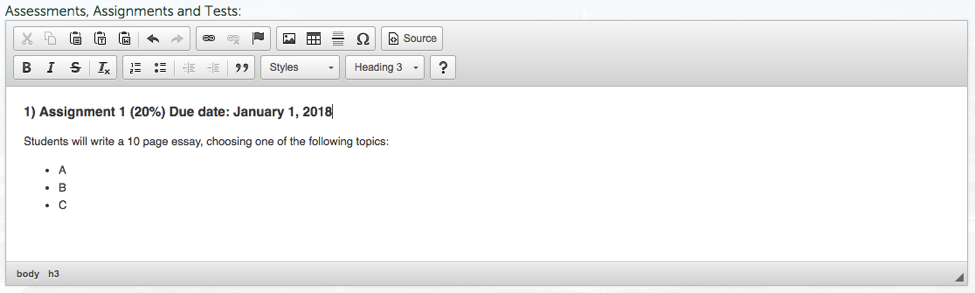
Linear Assignment Layout

Linear schedule layout
 

Lists and Headings

To assist you in creating a list format:

Headings: A helpful tool in creating lists are Headings. This enables screen readers of our blind users to parse through the syllabus section by section, and is a more accessible option than simply bolding. Heading types 1 and 2 have already been used in the template to distinguish between various fields in the syllabus, so you will want to start with Heading 3 and move down as needed.

Bullets: Bullets can be used and are AODA compliant.
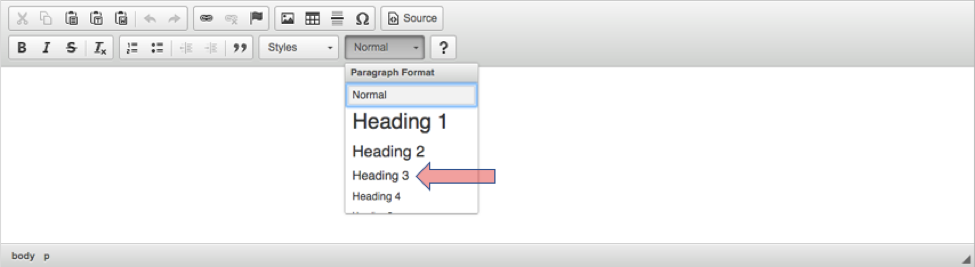
Styles dropdown
 

Tabs and Justification

Tabbing does not work in this template. Please keep all content left-justified. Please note that what is seen in the content box on the editing page is not consistent with how the published syllabus will look. Attempting to add spaces in order to “tab” or create a table-like structure will likely end up looking messy on the final product. 
 

Pasting Content from MS Word

You can copy/paste your content from MS Word, but as the translation from .DOCX to HTML5 isn’t always clean, you may run into some formatting issues. In order to minimize these issues, it is best to use the Paste from Word button. A box will pop up, and you will paste your content into this box rather than directly into the field being used. 
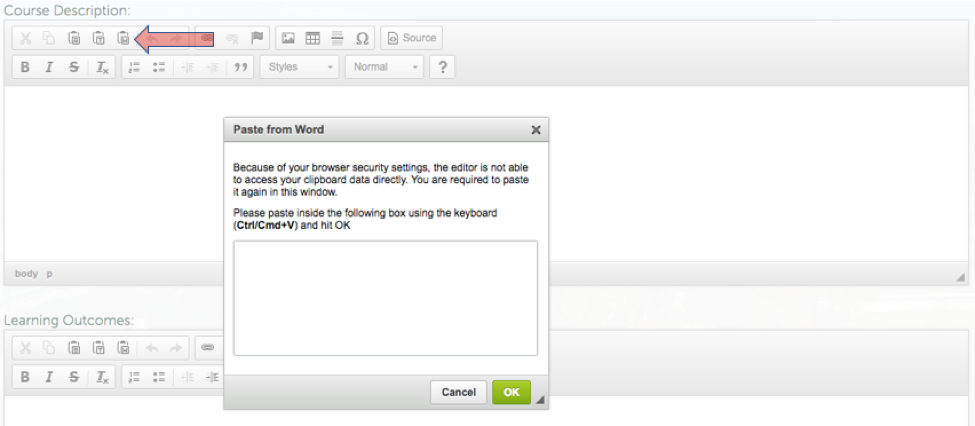
Pasting from MS Word

Creating a Syllabus

  • Creating a Syllabus
    • First Steps
    • Course Properties
    • Syllabus Content
    • HTML Tables
    • Tips and Tricks
    • School of Education
  • Copying/Sharing your Syllabus
  • Submission/Approval Process
  • Posting Your Syllabus
  • Making Changes After Approval

Related Links

  • Browser Requirements
  • Basic Web Accessibility Guide
  • AODA & WCAG Resources
Trent University Logo

Trent University respectfully acknowledges it is located on the treaty and traditional territory of the Mississauga Anishnaabeg. We offer our gratitude to First Peoples for their care for, and teachings about, our earth and our relations. May we honour those teachings.

The Campaign For
Momentous
Action Research Leadership Debate Performance Connection Discovery Ideas Places Stewardship Support Possiblity

Peterborough

1600 West Bank Drive
Peterborough, ON Canada, K9L 0G2

Toll Free: 1-855-MY-TRENT

Campus Map

Durham Greater Toronto Area

55 Thornton Road South
Oshawa, ON Canada, L1J 5Y1

Phone: 905-435-5100

Campus Map

Social Media Directory
  • Contact
  • Directions
  • Site Map
  • Accessibility
  • Privacy
  • @ Copyright 2025 Trent University