

Trent University
MyTrent
  • Academics
    • Undergraduate Programs
    • Graduate Programs
    • Trent Online
    • Summer Courses
    • Continuing Education
    • Study Abroad
    • Academic Calendar
    • Academic Timetable
    • Academic Skills Centre
    • Academic Advising
    • Library
    • Centre for Teaching and Learning
  • Admissions
    • Undergraduate
    • Thinking of Applying
    • Already Applied
    • Received an Offer
    • Accepted My Offer
    • Graduate
    • International
    • Indigenous
    • Returning to Trent
    • Transfer
  • Services & Support
    • Academic Advising
    • Academic Skills Centre
    • Administrative Departments
    • Alumni Services
    • Athletics
    • Campus Security
    • Careerspace
    • Colleges
    • Communications
    • Conferences
    • Financial Aid
    • Financial Services
    • Health & Wellness
    • Indigenous Services
    • Information Technology
    • International Students
    • Learning Support
    • Parking
    • Printshop
    • Recruitment
    • Registrar's Office
    • Residence & Housing
    • Student Clubs
    • TrentU Card
  • Research
    • Research at Trent
    • Research Centres
    • Find an Expert
    • Resources
  • Give to Trent
  • About Trent
    • About Trent
    • Careers
    • Giving to Trent
    • Governance
    • How to Find Us
    • Media
    • News & Events
    • President's Office
    • Staff Directory
    • Trent Facts
    • Contact Us
  • Campus Locations
    • Peterborough
    • Durham GTA
    • Online
  • Future Students
    • Undergraduate
    • Thinking of Applying
    • Already Applied
    • Received an Offer
    • Accepted My Offer
    • Graduate
    • International
    • Indigenous
    • Returning to Trent
    • Transfer
  • Current Students
  • The Colleges of Trent
  • Alumni
  • Apply
  • Visit
  • Give
  • Peterborough
  • Durham GTA
  • Map
  • Careers
  • Directions
  • Library
  • Site Map
  • Bookstore
Skip to main content Home
  • Peterborough
  • Durham GTA
  • Online
  • MyTrent
MENU
Students in the library
Trent University
Online Syllabus System
  • Welcome
  • Instructor
  • Department
  • Decanal
  • Contact
  1. Trentu.ca
  2. Online Syllabus System
  3. Creating a Syllabus
  4. Syllabus Content

Syllabus Content

Instructor Information

The next section of the syllabus template is the Instructor Information. The system will attempt to fill in the first three fields (Instructor, Email Address, and Phone Number) based on the account being used to create the syllabus. This information can be changed however, if needed.
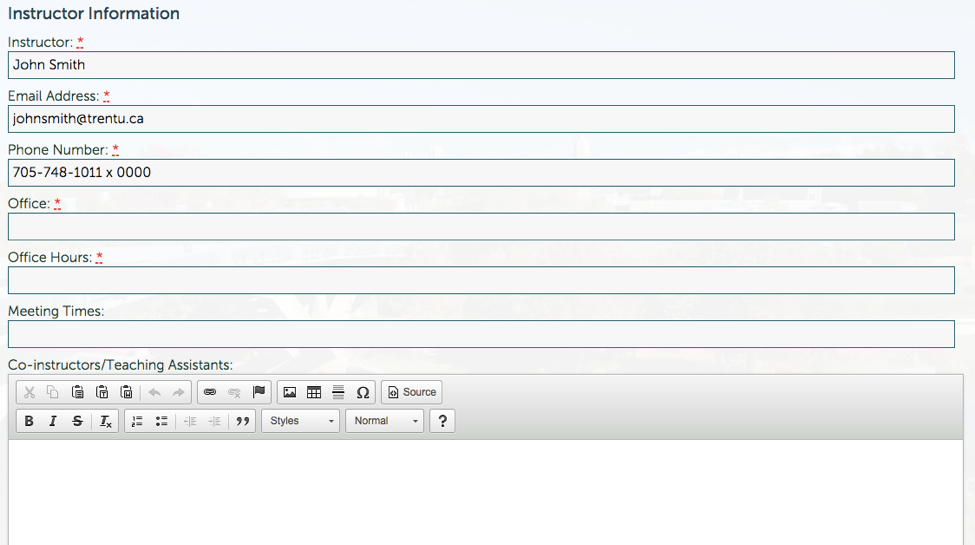
Instructor Information

*Please note that the classroom location should be included in the “Meeting Times” section, e.g. Monday 1-4pm, OC 142. 


Syllabus Content

The middle portion of the syllabus template focuses on the Syllabus Content. Please note that you should fill in these fields as best reflects your course, and you may not need to use each section. For example, you may wish to include your readings in the Schedule section, in which case you could leave the Readings field blank. If you leave a field blank, it will not show up in your final syllabus (i.e. there won’t be a large blank space; that field will simply be omitted entirely).
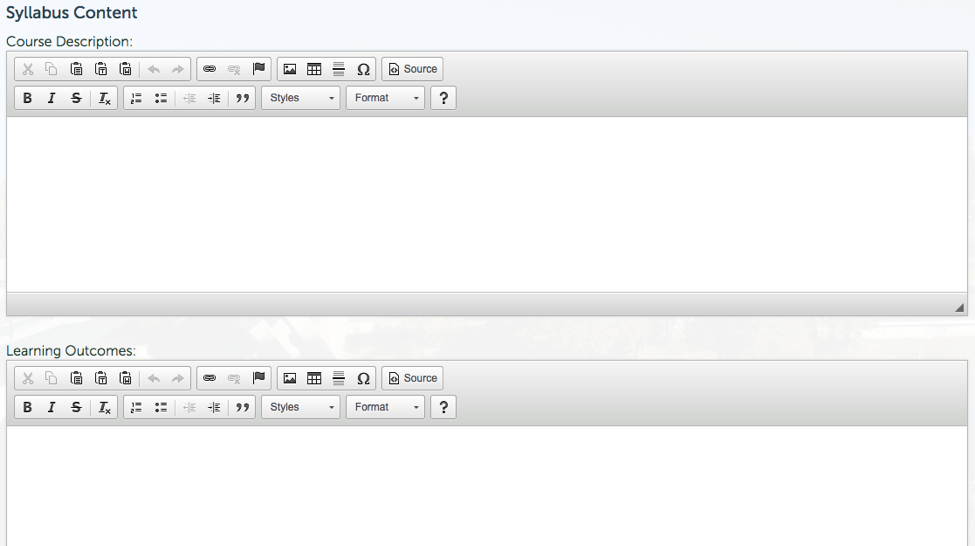
Syllabus Content

The various fields include:

  • Course Description: For example, the description as found in Trent’s Academic Course Listing.
  • Learning Outcomes: These are statements outlining what students will be expected to have learned by the end of the course; things that students will know or be able to do.
  • Course Fees: If there are any additional course fees, please include these here.
  • Texts: Any required or recommended texts associated with the course.
  • Readings: A schedule or list of any course readings.
  • Assessments, Assignments and Tests: An explanation of all assessments, assignments and tests that must be completed as part of the course.
  • Grading: A breakdown of the grading components for the course.
  • Course Guidelines: Any additional guidelines that are specific to this course. *Please note that departmental and University-wide guidelines will be automatically included in your syllabus, as a reflection of the information you have entered in the “Home Department” and “Year” fields at the top of your syllabus. You need only worry about course-level policies when you create your syllabus.
  • Schedule: An outline of the course schedule. 


Exam Information

Finally, at the bottom of your screen you will see Exam Properties. This section is used if you will be holding an exam during the regular exam period. If this section is filled in, it will notify the university to book an exam room (ie. the gym) for your course, so only complete this section if a room booking is necessary. 
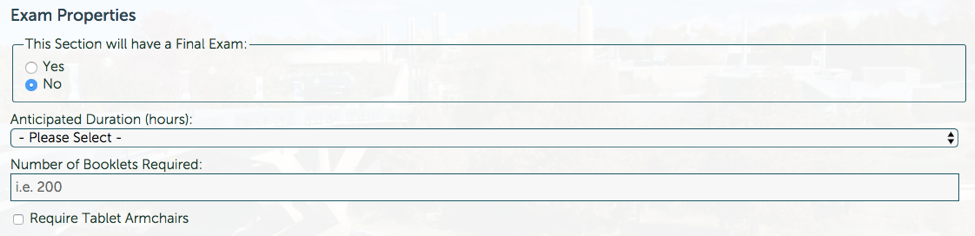
Exam properties

Creating a Syllabus

  • Creating a Syllabus
    • First Steps
    • Course Properties
    • Syllabus Content
    • HTML Tables
    • Tips and Tricks
    • School of Education
  • Copying/Sharing your Syllabus
  • Submission/Approval Process
  • Posting Your Syllabus
  • Making Changes After Approval

Related Links

  • Browser Requirements
  • Basic Web Accessibility Guide
  • AODA & WCAG Resources
Trent University Logo

Trent University respectfully acknowledges it is located on the treaty and traditional territory of the Mississauga Anishnaabeg. We offer our gratitude to First Peoples for their care for, and teachings about, our earth and our relations. May we honour those teachings.

The Campaign For
Momentous
Action Research Leadership Debate Performance Connection Discovery Ideas Places Stewardship Support Possiblity

Peterborough

1600 West Bank Drive
Peterborough, ON Canada, K9L 0G2

Toll Free: 1-855-MY-TRENT

Campus Map

Durham Greater Toronto Area

55 Thornton Road South
Oshawa, ON Canada, L1J 5Y1

Phone: 905-435-5100

Campus Map

Social Media Directory
  • Contact
  • Directions
  • Site Map
  • Accessibility
  • Privacy
  • @ Copyright 2025 Trent University