

Trent University
MyTrent
  • Academics
    • Undergraduate Programs
    • Graduate Programs
    • Trent Online
    • Summer Courses
    • Continuing Education
    • Study Abroad
    • Academic Calendar
    • Academic Timetable
    • Academic Skills Centre
    • Academic Advising
    • Library
    • Centre for Teaching and Learning
  • Admissions
    • Undergraduate
    • Thinking of Applying
    • Already Applied
    • Received an Offer
    • Accepted My Offer
    • Graduate
    • International
    • Indigenous
    • Returning to Trent
    • Transfer
  • Services & Support
    • Academic Advising
    • Academic Skills Centre
    • Administrative Departments
    • Alumni Services
    • Athletics
    • Campus Security
    • Careerspace
    • Colleges
    • Communications
    • Conferences
    • Financial Aid
    • Financial Services
    • Health & Wellness
    • Indigenous Services
    • Information Technology
    • International Students
    • Learning Support
    • Parking
    • Printshop
    • Recruitment
    • Registrar's Office
    • Residence & Housing
    • Student Clubs
    • TrentU Card
  • Research
    • Research at Trent
    • Research Centres
    • Find an Expert
    • Resources
  • Give to Trent
  • About Trent
    • About Trent
    • Careers
    • Giving to Trent
    • Governance
    • How to Find Us
    • Media
    • News & Events
    • President's Office
    • Staff Directory
    • Trent Facts
    • Contact Us
  • Campus Locations
    • Peterborough
    • Durham GTA
    • Online
  • Future Students
    • Undergraduate
    • Thinking of Applying
    • Already Applied
    • Received an Offer
    • Accepted My Offer
    • Graduate
    • International
    • Indigenous
    • Returning to Trent
    • Transfer
  • Current Students
  • The Colleges of Trent
  • Alumni
  • Apply
  • Visit
  • Give
  • Peterborough
  • Durham GTA
  • Map
  • Careers
  • Directions
  • Library
  • Site Map
  • Bookstore
Skip to main content Home
  • Peterborough
  • Durham GTA
  • Online
  • MyTrent
MENU
Studying in front of a shelf of books
Trent University
Online Syllabus System
  • Welcome
  • Instructor
  • Department
  • Decanal
  • Contact
  1. Trentu.ca
  2. Online Syllabus System
  3. Creating a Syllabus
  4. Course Properties

Course Properties

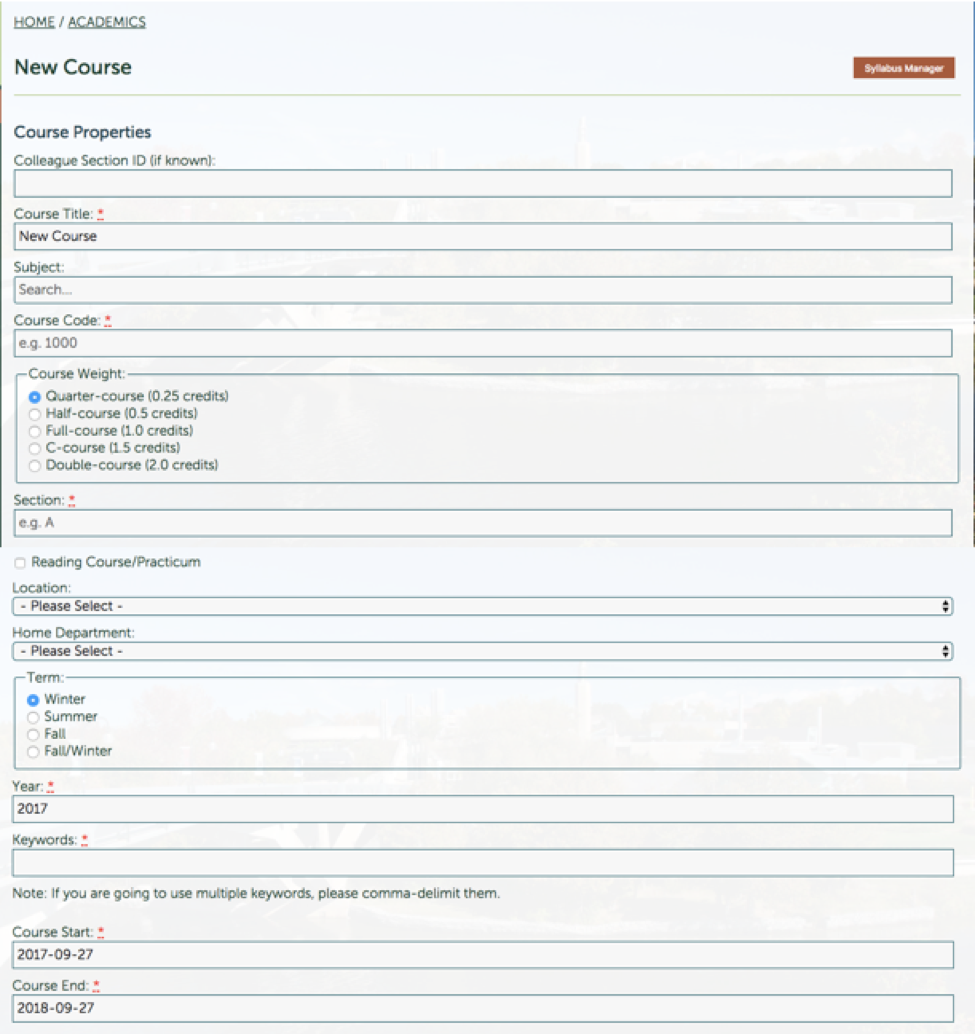
The top portion of the syllabus screen outlines the Course Properties:
Creating a Syllabus


What Information Should be Entered Here?

  • Colleague Section ID: This field is used to match your syllabus to a student’s class schedule, presenting them with a list of relevant syllabuses. This section does not need to be filled in if unknown.
  • Course Title: The title of the course, i.e. Greek Mythology
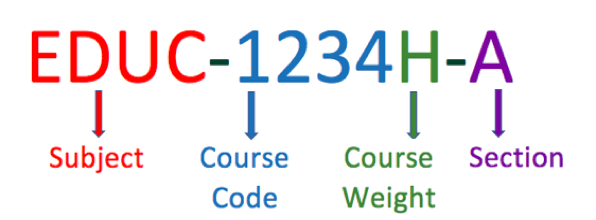
  • Subject, Course Code, Course Weight, Section: 
    Course Code Explanation
    *If there is only one section for your course, you will enter “A”
    *You can only enter one section letter per syllabus. If you teach multiple sections of the same course, you will need to create a copy of your syllabus and change the section letter in each copy (See “Copying and Sharing a Syllabus”).
  • Reading course/practicum: This field is used to distinguish between courses with multiple students, and research/practicum courses (usually with one professor and one student).
  • Location: On which campus does the course take place?
  • Home Department: Which department “owns” this course? In the case of cross-listed courses, it is only necessary to select the home department
  • Term: When is this course taking place?
  • Keywords: Keywords is a meta-data field, which can be used to help students find your course. For example, if your course is part of a stream that isn’t otherwise clear in the course title, you might want to list it here, e.g. Neuropsychology, European History, Law.
  • Course Start: The first day of class.
  • Course End: The last day of class.  

Crosslisting

If your course is cross-listed with other departments, the Subject field should be populated with the course's primary subject (i.e. CUST) - make sure to also designate this department as the course's home department. The other subjects that the course falls under should then be populated in the cross-listings field, in the following format: BIOL-CHEM-WMST.

Creating a Syllabus

  • Creating a Syllabus
    • First Steps
    • Course Properties
    • Syllabus Content
    • HTML Tables
    • Tips and Tricks
    • School of Education
  • Copying/Sharing your Syllabus
  • Submission/Approval Process
  • Posting Your Syllabus
  • Making Changes After Approval

Related Links

  • Browser Requirements
  • Basic Web Accessibility Guide
  • AODA & WCAG Resources
Trent University Logo

Trent University respectfully acknowledges it is located on the treaty and traditional territory of the Mississauga Anishnaabeg. We offer our gratitude to First Peoples for their care for, and teachings about, our earth and our relations. May we honour those teachings.

The Campaign For
Momentous
Action Research Leadership Debate Performance Connection Discovery Ideas Places Stewardship Support Possiblity

Peterborough

1600 West Bank Drive
Peterborough, ON Canada, K9L 0G2

Toll Free: 1-855-MY-TRENT

Campus Map

Durham Greater Toronto Area

55 Thornton Road South
Oshawa, ON Canada, L1J 5Y1

Phone: 905-435-5100

Campus Map

Social Media Directory
  • Contact
  • Directions
  • Site Map
  • Accessibility
  • Privacy
  • @ Copyright 2025 Trent University