

BROWSE OUR SUMMER PROGRAMS HERE
Online Registration System
The Trent Athletics Centre offers an online, mobile-friendly registration system – PerfectMind -- available to Trent students, Athletics Centre members, and anyone wanting to register for a program. This online feature offers enhanced features and is available at your convenience, 7 days a week, 24 hours a day.
To register for a program or access your Athletics Centre membership account online, you will need an online account profile. Learn more by reviewing our frequently asked questions below or call the Athletics Centre at 705-748-1257.
Frequently Asked Questions:
Account Information
How do I know if I have an existing account in the registration system?
Current Trent University students registered in classes on the Peterborough campus are already active and in the registration system.
All customers with an active Athletics Centre membership automatically have an account.
All new customers need to create an online profile in the new system.
How do I access my online account? (Current Trent Students and Active Members)
1. Visit www.trentu.ca/athletics and click on

2. You do NOT need to create an account.
3. You DO need to reset your password.
4. Simply enter the e-mail address that you have on file with the Athletics Centre.
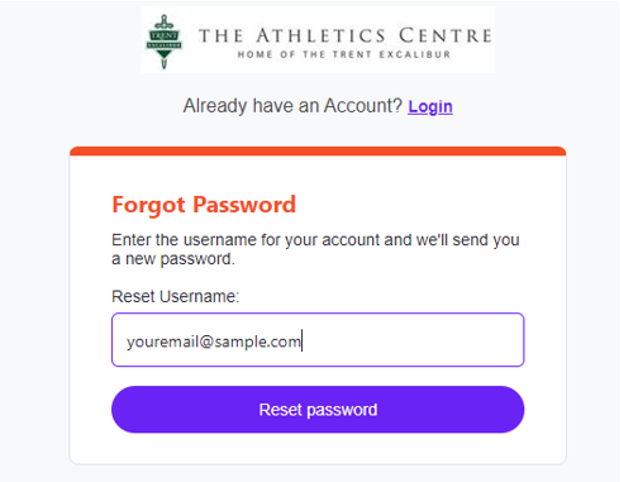
5. Select Reset Password.
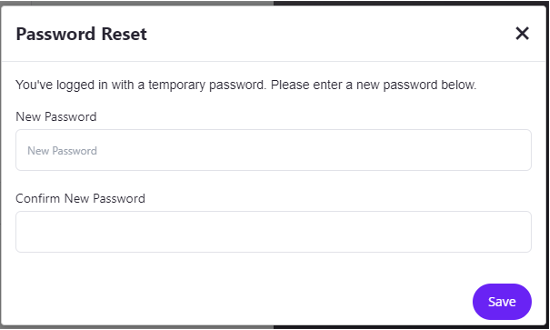
6. You will receive an email from communications@perfectmind.com with your temporary password. Check your spam or junk folders if you do not see it in your inbox.
7. You can then login in using your email and temporary password and then it will prompt you to create your own password.
How do I create an online account if I’m a NEW customer?
If you aren’t already in the Athletics Centre registration system as an active member or current program registrant, you need to create a new account:
1. Visit www.trentu.ca/athletics and click on
2. Select “Signup”
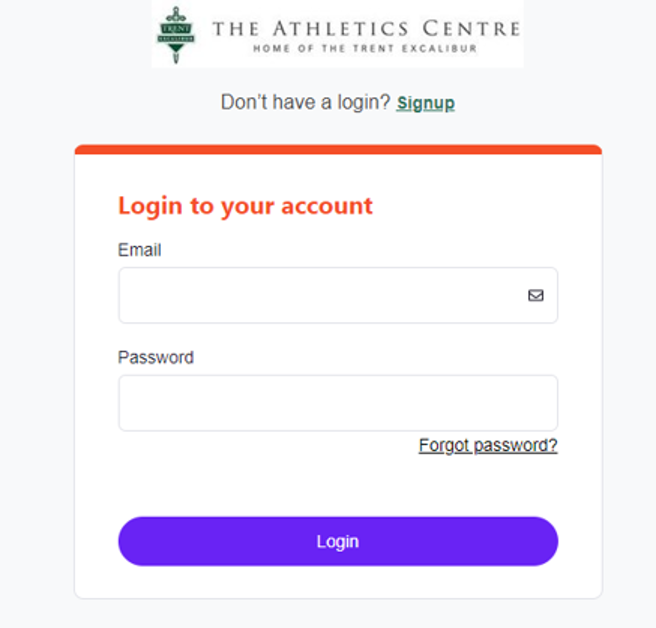
3. Complete all information fields on the page, including but not limited to, name, date of birth, email address, mailing address, etc.
4. Please review the Terms and Conditions and click to accept.
5. Confirm you are not a robot and then you can click submit.
6. You will receive an email from communications@perfectmind.com with your temporary password. Check your spam or junk folders if you do not see it in your inbox.
7. Go back to the registration login page
8. You can then login in using your email and temporary password and then it will prompt you to create your own password.
9. Once you've done that, you can login with your email and your new password.
What if I forget my password. Can I reset it?
If you have forgotten your password, visit the registration login page and click on the “Forgot Password” link and follow the steps to reset your password. Note: the password reset e-mail will be sent to you from communications@perfectmind.com. If you do not see the e-mail in your inbox, please check your junk mail folder.
How do I add family members to my account?
If you are listed as the primary contact on your account, you can view and other other family members when you login to your account. Family members are set up as individual customers under the primary contact. Click the “Add Family Member” button and follow the prompts to create their account so that you can register them for programs and services.
How do I edit information on my customer profile?
Account information can be modified by selecting the customer under 'My Info' and selecting 'Edit'. We encourage all customers to ensure these fields are up to date, as the information on your profile will be the information staff will reference when updating and communicating with you on our programs and services.
How can I get information on programs for which I have registered?
View and add programs by selecting the customer under 'My Info' and scrolling down to the 'Schedules'. A summary of programs for which you are registered can be viewed as a 'Calendar View' or 'List View'. You can also print your confirmations or add registration reminders to your calendar.
How do I add or update financial information on my account?
Financial information can be saved to your account for future registrations, payments and refunds (where applicable). To view, add or update financial information on your account, select 'My Info', select the customer for whom you are uploading financial information (where applicable), then scroll down to 'Finance Info'. To add new details, select 'New' and follow the prompts. To use this credit card as your default for pre-authorized payments, check off ‘Default’.
How can I view transactions on my account?
View transaction history, including item name, dates and amounts paid, by selecting the customer under 'My Info' and scrolling down to 'Transactions'.
How can I view or pay my invoices?
View past or upcoming invoices, and outstanding balances, by selecting the customer under 'My Info' and selecting 'Invoices' at the top right-hand side of the customer profile. To make a payment, select the desired invoice followed by 'Make Payment'.
Program Registration
What if this is my first time registering for a program?
First time participants can create their own accounts online by following the steps above, “How do I create an online account if I’m a NEW customer? “
How do I register for a program online?
To register for a program online, login in to your account on the registration portal, select “Activity Registration” along the top ribbon of your screen. Here you will have the ability to filter your search based on preferences such as date and area of interest. Learn more about How to Register for a Program here.
Do I need to add my family members to register someone else for a program?
You need to add your children or other family members to your account if they will be the ones participating in the program. You should create yourself as the Primary contact for your account profile, and then click the “Add Family Member” button and follow the prompts to create their account so that you can register them for programs and services.
How do I know if I’m registered?
Once you register online, a receipt and confirmation will be sent to the e-mail associated to the purchase. Additionally, registration confirmations can be accessed, e-mailed and printed online through your account.
How to Register for a Squash Court or Climbing Wall
As a Trent student or Athletics Centre member, you have access to use our specialty facilities at no charge– squash courts and indoor rock climbing wall. Both facilities can be reserved in advance through the online registration system.
Please note that individuals wishing to use the indoor rock climbing wall must complete a rock wall introductory lesson. This mandatory 90-minute basic introductory lesson provides climbers with knowledge of basic climbing and safety procedures for climbing and belaying. Introductory lessons are open to two people per booking period.
Simply visit our online registration system to reserve a squash court or sign up to use the climbing wall.