

The Exception is the Rule
In the Online Syllabus System, departments are handled a little differently than they are in the real world. While it's possible to match them 1:1, this isn't always desirable.
For example: the School of Education has two distinct streams which have a small amount of overlap, but not to the point where configuring the Syllabus System with one EDUC department would make sense. To properly support their differences, we chose to create two School of Education departments: Bachelor of Education and Teacher Education Stream. While they share the same department code, EDUC, the syllabuses belonging to each can now be reviewed by different support staff, and the different departmental policies that each stream uses can be applied appropriately.
It is important to note that configuring departments this way shouldn't be taken lightly; juxtaposed against the greater granularity that splitting a department into its different academic branches affords is the increase in overhead that comes with maintaining two different sets of syllabuses, two sets of policies, and two sets of departmental administrators. For example, if a department has several different academic streams, but the same departmental policies apply, and the same people are overseeing the approval process, it may not make sense to create a separate department for each stream, as there would no inherent benefit to do so
The mechanics of departmental configuration are very simple, and intended to be flexible enough to address any department's policies and process. As a result, a department can be configured in many ways, some more effective than others, depending on your specific wants and needs.
Consider:
- How important is it to stream different subsets of your courses? If very, do different streams use different sets of departmental policies? Do different people approve the different streams? If the answer to either of these questions is "yes", it might make sense to create and manage two departments in the Online Syllabus System in the same way that Education did. Of course, the department must weigh the tradeoff between greater granulatity and increased overhead.
- Will administrative staff have the ability to make changes to approved syllabuses? If so, who, and under what circumstances? The system itself doesn't care (an administrator can be configured to either edit or not), so if there are constraints on how/what can be edited, the department must draft policy to clearly spell this out.
- Who will be responsible for the ongoing administration of the department? Will it be one person or many? How will succession be handled?
Diving In
Once you've planned out the topography of your department, the next step will be to populate it with content. First, let's open the "Configure Syllabus Manager" application.
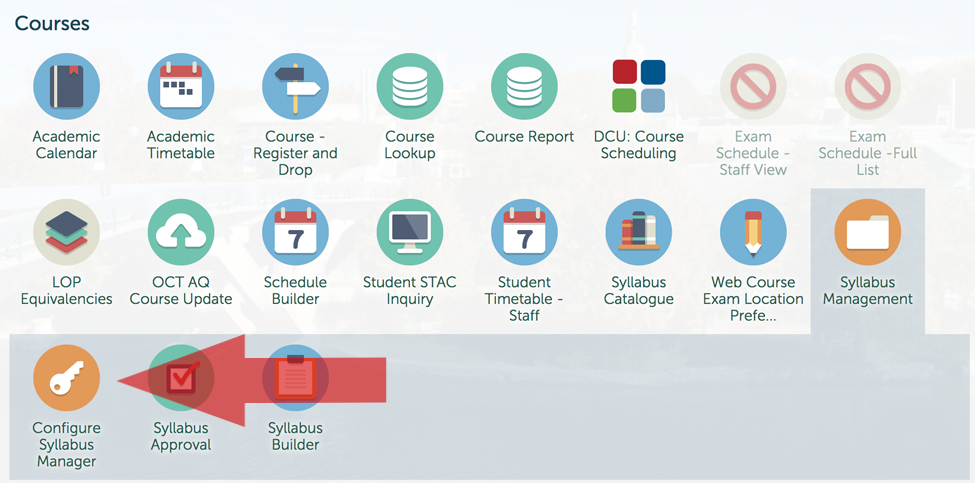
Once in, you'll be greeted by the Department Management Screen. From here, you'll either choose your existing department, or click the "New Department" button.
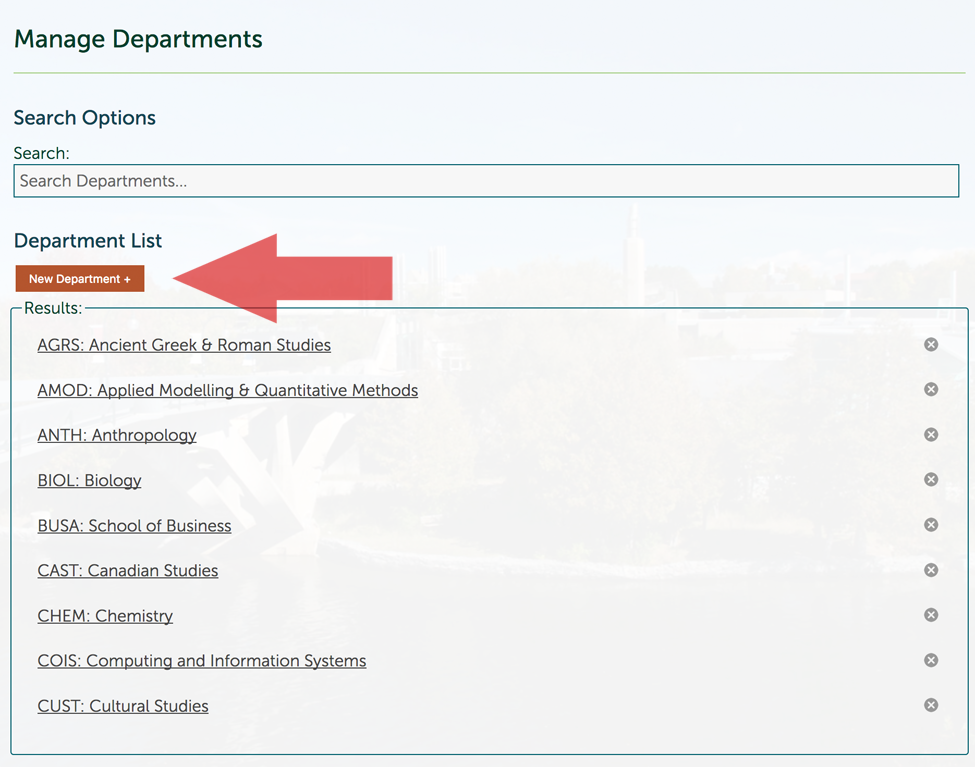
If you've chosen to create a new department, you'll be presented with a new department that you ca configure.
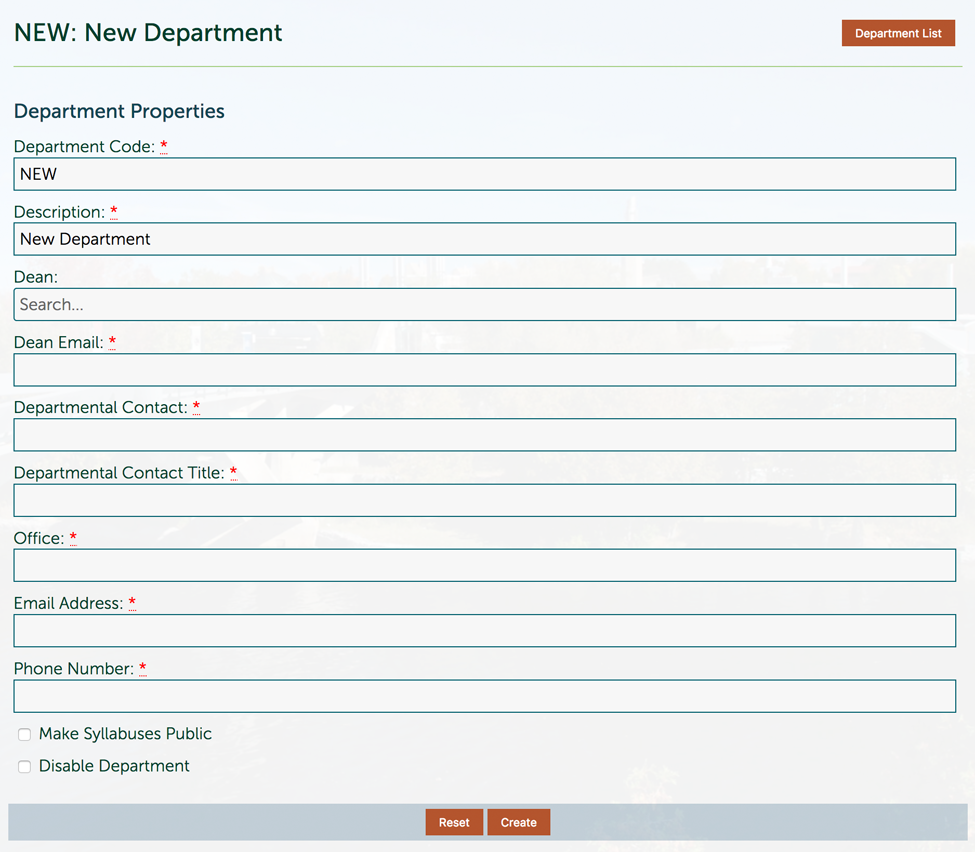
The fields are as follows:
- Department Code: This is the Colleague Department code assigned to your department, e.g. HIST, CHEM, or EDUC.
- Description: This is the description of your department. If you've chosen to use one department, giving it the same name as your academic department makes the most sense. However, if you've split your academic department into several streams, you might choose to name them accordingly, remembering that your instructors will need to be able to find them in order to attach their syllabuses to them. For example: School of Education - Bachelor of Education and School of Education - Teacher Education Stream.
- Dean: The Dean who oversees your academic department. In the case of sabbaticals and leaves, this field should reflect the acting Dean.
- Dean Email: The Dean's email address, or the intermediary address through which they should be contacted.
- Departmental Contact: This is the staff member who provides frontline support to students, usually the Academic Administrative Assistant.
- Departmental Contact Title: The departmental contact's job title.
- Office: Where your department is located on campus.
- Email Address: The department's general email address, or the email address of the departmental contact.
- Phone Number: The department's phone number, or the phone number of the departmental contact.
- Make Syllabuses Public: Some departments choose to share their syllabuses on their website and others don't. By checking this option, published syllabuses will be visible on departmental websites (currently, this is a feature in development). Note: reading courses and practicums will not ever appear publicly.
- Disable Department: In the extremely unlikely event that a department is closed or consolidated into another department, you'll want to check this box. It'll preserve historical syllabuses connected to the department, but will prevent any new syllabuses from being associated with it.
When finished, click the "Create" button.