Trent University
MyTrent
  • Academics
    • Undergraduate Programs
    • Graduate Programs
    • Trent Online
    • Summer Courses
    • Continuing Education
    • Study Abroad
    • Academic Calendar
    • Academic Timetable
    • Academic Skills Centre
    • Academic Advising
    • Library
    • Centre for Teaching and Learning
  • Admissions
    • Undergraduate
    • Thinking of Applying
    • Already Applied
    • Received an Offer
    • Accepted My Offer
    • Graduate
    • International
    • Indigenous
    • Returning to Trent
    • Transfer
  • Services & Support
    • Academic Advising
    • Academic Skills Centre
    • Administrative Departments
    • Alumni Services
    • Athletics
    • Campus Security
    • Careerspace
    • Colleges
    • Communications
    • Conferences
    • Financial Aid
    • Financial Services
    • Health & Wellness
    • Indigenous Services
    • Information Technology
    • International Students
    • Learning Support
    • Parking
    • Printshop
    • Recruitment
    • Registrar's Office
    • Residence & Housing
    • Student Clubs
    • TrentU Card
  • Research
    • Research at Trent
    • Research Centres
    • Find an Expert
    • Resources
  • Give to Trent
  • About Trent
    • About Trent
    • Careers
    • Giving to Trent
    • Governance
    • How to Find Us
    • Media
    • News & Events
    • President's Office
    • Staff Directory
    • Trent Facts
    • Contact Us
  • Campus Locations
    • Peterborough
    • Durham GTA
    • Online
  • Future Students
    • Undergraduate
    • Thinking of Applying
    • Already Applied
    • Received an Offer
    • Accepted My Offer
    • Graduate
    • International
    • Indigenous
    • Returning to Trent
    • Transfer
  • Current Students
  • The Colleges of Trent
  • Alumni
  • Apply
  • Visit
  • Give
  • Peterborough
  • Durham GTA
  • Map
  • Careers
  • Directions
  • Library
  • Site Map
  • Bookstore
Skip to main content Home
  • Peterborough
  • Durham GTA
  • Online
  • MyTrent
MENU
trent panorama
Trent University
Communications & Enrolment
  • Welcome
  • Communications
  • Recruitment & Admissions
  • colleges
  • Contact
  1. Trentu.ca
  2. Communications & Enrolment
  3. Web Resources
  4. Drupal User Guide
  5. Drupal Website Photography Guidelines

Drupal Website Photography Guidelines

Quick Links

  • Understanding the Photography Zones on Trent University Drupal Websites
  • Banner Photography
  • Promo Photography
  • Pullout Photography

Understanding the Photography Zones on Trent University Drupal Websites


There are 3 main photography zones:

  • Banner photo
  • Promo photo
  • Pullout photo

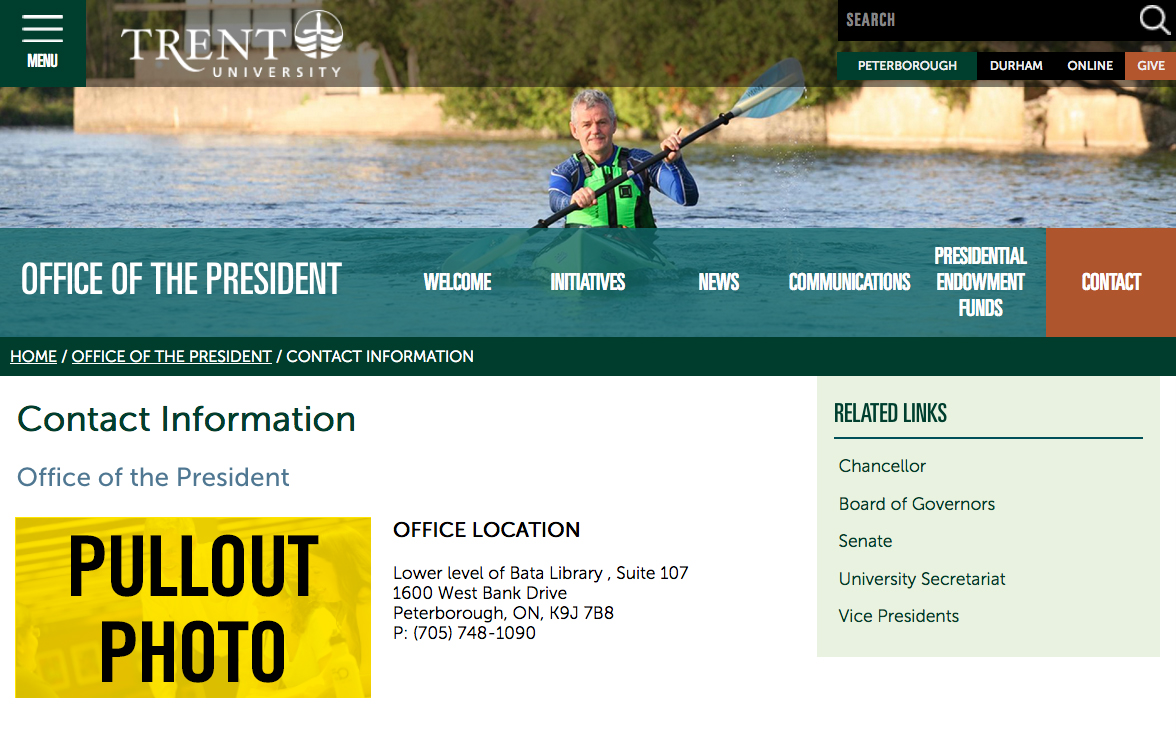
Each zone is highlighted in yellow, below in the website screen grab, and then described in detail.
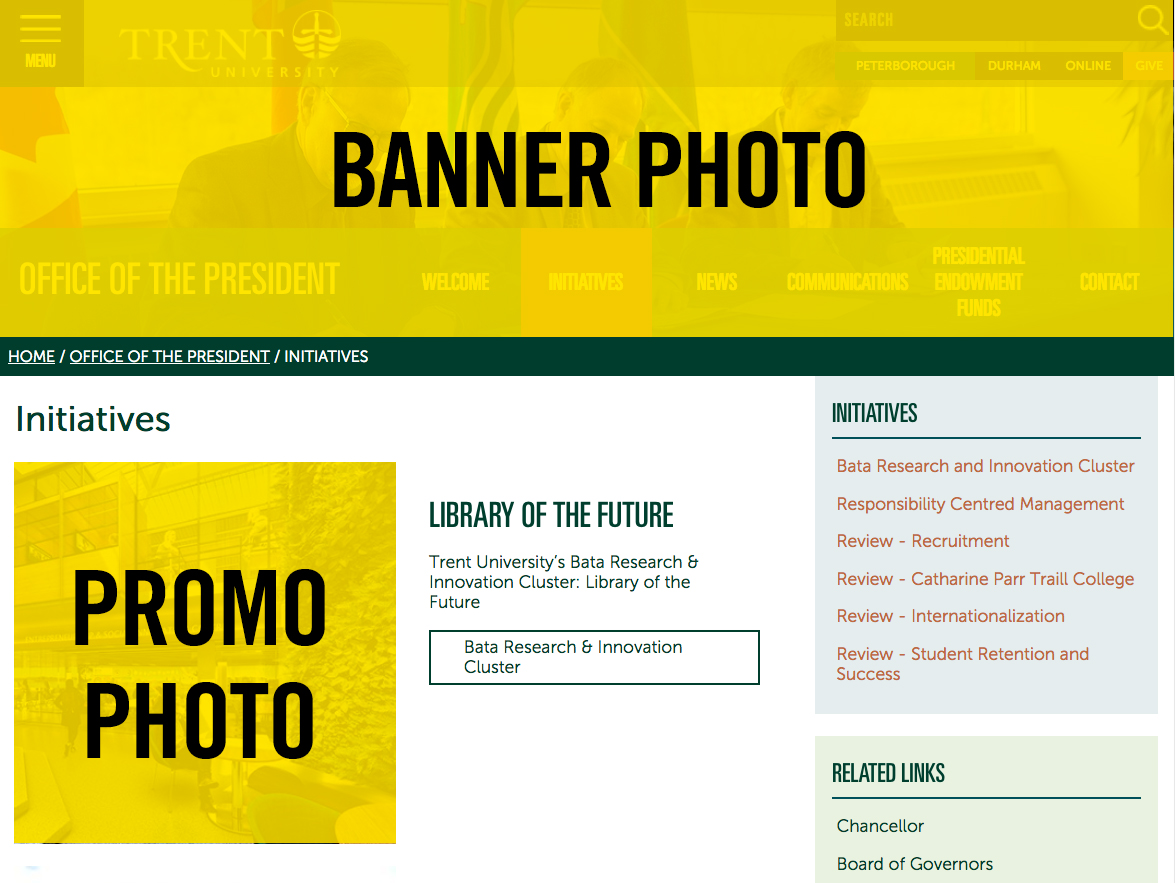
Screengrab of a Trent University webpage highlighting the image zones for the banner and the promo zones

Screengrab of a Trent University webpage higlighting the pullout photography zone


Banner Photography


Follow the Trent University photography guideline checklist when taking and searching for new photography for your Drupal website:


  • Use the Trent University Photography Catalog to select your imagery
    • Media waivers have been signed for all recognizable persons in the photography in the Trent University Photography Catalog, thus Trent University owns the rights to use those digital assets on our website and other marketing material.
    • You cannot upload digital assets to your website that Trent University doesn't own the rights/permissions to, via a media waiver form.
  • Is the photograph file size large enough?
    • The image must be more than 2 MB in size to accommodate the screen resolution needed and at least 1400 pixels wide X 400 pixels high at 72 pixels per inch
  • Is the orientation appropriate?
    • Select only landscape style photography, portrait style won’t fit
  • Is the photograph current?
    • No more than 3-5 years old if possible
  • Does the subject matter reflect your department visually and accurately?
    •  
      • Banner images have been strategically sized to take up the full horizontal expanse of your browser window and placed at the top of the webpage so that they are the first visuals that website visitors see when they arrive on your website. They have been designed in a way that make the website user feel as though they are apart of the experience, that they can jump right into the action. Banner images are a visual representation of your department and should feel inviting, exciting and accurately depict the emotion and experience that a visitor to your department would experience.
        • Do:
          • Happy smiling faces
          • Bright and airy backdrops
          • Colorful palette
          • Sharp focus
          • Action shots
          • Distinct focal point
          • High resolution
          • Trent University staff, faculty and students
        • Don't
          • Hidden faces
          • Backs to the camera
          • Overly busy backdrops with no distinct focal point
          • Out of focus
          • Pixilated low resolution
          • Non Trent University staff, faculty or students
          • Add typography to the photograph, this is not accessible and will compete with the graphic design on the web page
      • Can't find a photograph to represent the web page subject matter?
        •  
          • In some cases it’s necessary to use a generic photograph to represent the subject matter. If that's the case consider a general campus photograph.
          • Occasionally a stock photograph is required, but generally not recommended. If it is required, please visit the Thinkstock website to search for an appropriate photograph and send the filename in a request to webrequest@trentu.ca

Promo Photography


Promo photographs are merely a cropped version of the corresponding banner photographs; there's no need to select a unique photograph for this application.


Pullout Photography


Pullout photographs are:

  • 325 pixels wide x 165 pixels high at 72 pixels per inch
  • left aligned
  • padded in order that text won't overlap the image

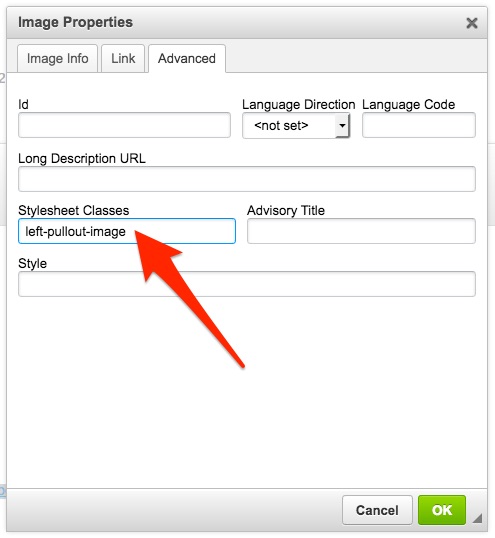
The style outlined above is achieved by applying a CSS class to the cropped image named: left-pullout-image and is achieved by:

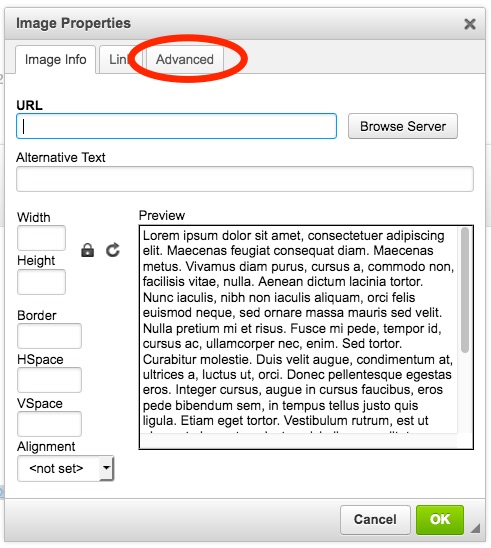
  1. In edit mode, navigate to the Body content area and double-click the pullout image and the Image Properties dialog box will appear.
  2. Click on the Advanced tab.
    Image Properties dialog box highliting the Advanced tab
  3. In the Stylesheet Classes field, type left-pullout-image
    Image Properties panel highltighting the Steylsheet Classes field
  4. Click OK

Drupal User Guide

  • Communications Resources
  • Web Resources
    • Siteimprove - Website Content Accessibility
    • Digital Asset Resources
    • Digital Signage
    • Drupal User Guide
      • Glossary
      • Drupal 7 User Guide - General
      • Drupal Subsite Documentation - IT Website
      • Drupal Subsite Documentation - Future Students
      • Drupal Website Photography Guidelines
    • How to Create An Event on MyTrent 
  • Brand Guidelines & Logo Standards
  • Business Cards & Letterhead
Image
Communications, Enrolment & The Colleges Annual Report

Champlain

Trent University Logo

Trent University respectfully acknowledges it is located on the treaty and traditional territory of the Mississauga Anishnaabeg. We offer our gratitude to First Peoples for their care for, and teachings about, our earth and our relations. May we honour those teachings.

The Campaign For
Momentous
Action Research Leadership Debate Performance Connection Discovery Ideas Places Stewardship Support Possiblity

Peterborough

1600 West Bank Drive
Peterborough, ON Canada, K9L 0G2

Toll Free: 1-855-MY-TRENT

Campus Map

Durham Greater Toronto Area

55 Thornton Road South
Oshawa, ON Canada, L1J 5Y1

Phone: 905-435-5100

Campus Map

Social Media Directory
  • Contact
  • Directions
  • Site Map
  • Accessibility
  • Privacy
  • @ Copyright 2025 Trent University